ActMask Universe Virtual Printer Driver SDK, allows you to integrate Virtual Printer and Document Converting features into your own application. Print any document then export PDF, TIFF, JPG, PNG, GIF, BMP, TGA, PCX, TXT, EMF or SPL format ( .SPL, Print Spooling File ) from ActMask Virtual Printer Driver.
ActMask Virtual Printer Driver is based on virtual printing technology and designed for Win 9X/2K/XP/2003/Vista/7/8/10/2008/2012 R1 & R2 32 and 64 bit OS.
Our well-known customers: Citrix, Lexmark, OKI, Intuit, ARTI(XEROR Partner), Overnite Express Limited, Worthware Systems, Techleader Co., Ltd, Extract Systems, LLC, Neotechsoft Co. Ltd, Abelssoft GmbH, Westminster School, BRAVOSOFT, eWorld Com Kft, IC TELECOM, etc.
And ActMask Universe Virtual Printer Driver SDK supports more advanced features:
1. Strong installation. Fix wrong Windows configuration may cause install printer failure.
2. Support shared printer, support Citrix MetaFrame & Citrix Presentation Server, Windows Terminal Service.
3. Support RAW type, support SAP, Quicken, QuickBooks (for example, SAPGUI, Quicken2008, QuickBooks2008 and all version of Intuit's products). To evaluate SDK RAW type, please contact support.
4. Redirect print job to another printer, really support POS printer.
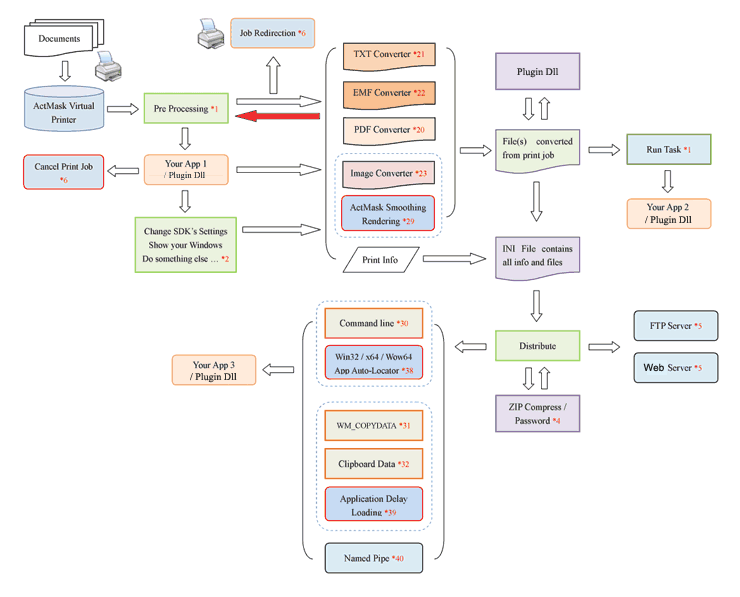
5. Allow you to call your own Pre-Processing application or Plug-in dll to handle job conversion, you can change SDK settings dynamically or do something you want.
6. Support EMF file which uses Embedded Adobe PDF fonts (printed from Adobe PDF products).
7. Provide tools for changing DPI / Paper Size.
8. Provide separate FTP client.
9. EMF to PDF, TIFF, JPG, PNG, GIF, BMP, TGA, PCX, TXT, SPL ( .SPL, Print Spooling File ).
10. HTML to PDF, TIFF, JPG, PNG, GIF, BMP, TGA, PCX, TXT, EMF, SPL ( .SPL, Print Spooling File ).
11. SPL ( .SPL, Print Spooling File ) to PDF, TIFF, JPG, PNG, GIF, BMP, TGA, PCX, TXT, EMF.
12.
Provide GUI tool to help you setup SDK easily.
If you have further questions please do not hesitate to contact our support.


Customer Reviews
What was the biggest influence on your decision to purchase our software?
Jeff Shergalis: It met the requirements we had as far as behavior (i.e. we wanted something with our brand, something that could silently install, something that could launch an application after printing rather than having to run a service in the background waiting for printer messages).
Jeff Shergalis: Overall I have been very pleased with the product. I tested about 10 other SDK's and only one other one seemed like it would possibly meet our needs, but your product was easier to use and performed better.
Jonathan Matthews: Easy configuration, excellent support & bug fixing turnaround.
Sven Abels: The software itself (test version worked very fast and with good quality). Outstanding and very fast user support (our questions have been answered within just a view hours). Good price.
Szabolcs Toth:
1. Very good support and development team!!! and product test possibility.
2. Good solution and good website.
3. Good price.
Keep doing it as well as now!
Richard Hindley: Ease of use.
Sotiris Spanos: Developer Kit with customization + Free Runtimes + Fair price .
| Highlight features | Supported |
| Export EMF, PDF, TXT, TIF, JPG, PNG, GIF, BMP, TGA, PCX, SPL format | Yes |
| Specify file name / folder for output | Yes |
| Provide all print information | Yes |
| Image Smoothing Rendering / Resizing | Yes |
| Support Bits Per Pixel, Compression, Dithering for creating graph files | Yes |
| Keep layout formatting possible for TXT output | Yes |
| Print Job Redirection, really support POS printer | Yes |
| Customize text, font, size, rotation and position for watermark | Yes |
| Provide Pre-Processing feature, allows your application to do something before converting | Yes |
| Call your plug-in dll, allows your application to do something / analyze document content before converting | Yes |
| Call your plug-in dll, allows you to change SDK settings dynamically when SDK converts print job | Yes |
| Convert EMF / HTML / SPL to target formats | Yes |
| Zip compression and Password protect | Yes |
| Upload files to FTP server, and built-in and separate FTP clients | Yes |
| Support sock4/5 proxy | Yes |
| Pass file(s) and print information to your application via command line / WM_COPYDATA message / Clipboard / named pipe | Yes |
| Provide "Delay load" function. If your app is not running, load your app first then transfer all information to it | Yes |
| more features ... |
Why ActMask Virtual Printer Driver SDK?
We provide low cost, easy to use, high performance and high reliability SDK products what are used by a number of companies. Our SDK experienced rigorous testing on Win9X/2K/2003/XP/Vista 32 and 64 bit operating systems, obtained compliment and trust from customers such as Lexmark, OKI, Intuit, ARTI(Xerox Partner), Overnite Express Limited, Worthware Systems, Techleader Co., Ltd, Extract Systems, LLC, Neotechsoft Co. Ltd, Abelssoft GmbH, Westminster School, etc.
Very powerful product, very easy to use, fantastic virtual printing capability
Do you want to know why customer chooses our SDK after evaluating 10+ products? Wow, let's see what you can do based on this powerful product, and you'll find that all you should do is copy and paste code from samples we provided into your project.
Export multi-format at a time
Export PDF, TIFF, JPG, PNG, GIF, BMP, TGA, PCX, TXT, EMF and SPL formats at a time with just one print!
Faster print / conversion speed
Experience the faster print / conversion speed.
Support RAW type, SAP, Quicken and QuickBooks
Only our SDKs support RAW type, SAP, all version of Quicken / QuickBooks (for example, Quicken 2008 or previous version of Quicken / QuickBooks), export REAL EMF and PDF, TIFF, JPG, PNG, GIF, BMP, TGA, PCX, TXT formats!
To evaluate SDK supports Quicken and QuickBooks, please send request to support@all2pdf.com
Catch Core Printing Parameters from Print Job
Our SDK catches print job and provides all printing parameters, lets you know the user's printing operations and processes task you wanna do. Only our leading SDK, ActMask Virtual Printer Driver has ability to provide some core printing parameters such as Pages Per Sheet, name of Windows Terminal computer and more.
Install Virtual Printer Driver without rebooting computer
Most users hate rebooting computer after installing. Yes, our SDK dose not reboot customer's computer on Win2K/2003/XP/Vista and your end user can experience your application immediately ! Try this impressive, amazing product now !
Provide Platform-Independent Constants
Only our SDK, ActMask Virtual Printer Driver provides Platform-Independent Constants - {sys} and {pf}. This feature is very helpful to dispose your application or migrate your 32 bit application to 64 bit OS smoothly.
With the driver configuration tools, you can simply use Platform-Independent Constants to specify your application what will be called after printing, but without caring about details below.
1. Real location of your application on end user's computer. For example, maybe the target path on end user is different from the path on your computer.
2. The Windows OS Platform (32 or 64 bit OS). 64 bit Windows OS applies file system redirection for 32 bit application, that means the location of 32 bit exe file on 64 bit OS is different from its location on 32 bit OS.
For example, specify your application will be called after printing: {pf}\Your Software\YourApplication.exe
Really support Windows Terminal Server / Service (Windows Remote Desktop Connection)
Unlike some products of other companies, our SDK, the ActMask Virtual Printer Driver really supports Windows Terminal Server / Service, it distributes created file(s) to document's owner immediately. Some products of other companies distribute/get created file(s) to the document's owner via writing and checking file name to/from registry values, this will lead to loss of performance and or damage.
Single one installation package
Unlike some products of other companies, we provide All-In-One installation package for Win9X/2K/XP/2003/Vista 32 and 64 bit systems. One installation package for all versions of Windows is enough! This's very helpful to dispose your application.
Full control of PDF / Image output, Smooth Printing / Scaling for superior image quality
PDF: Complete control, creates small file size PDF, provides title, keywords, 128 bit Encryption Protection, Font Embedding, Font/Content/Image Compression, Optimization options and more.
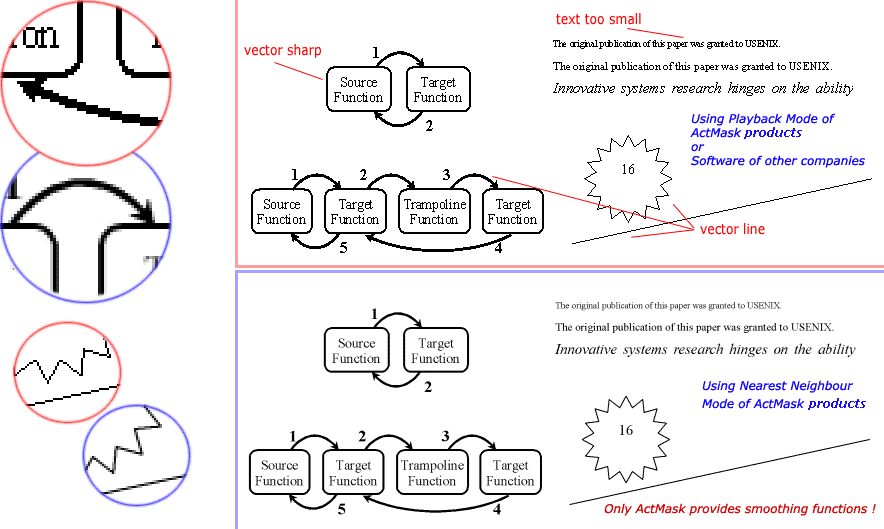
Image: What you see is what you get! And, unlike products of other companies, you can directly specify width and length for graphics output without changing DPI setting of printer! Three printing/scaling modes are provided:
-
Simple Playback: Use this option to get the fastest speed for rendering.
Nearest Neighbour / Bilinear: Use this option to get smooth, professional-quality graphics output. You will leave deep impression on these functions if the document contains small text (characters rendered in too small font size), vector line, vector shape or picture with obvious outline, see below. Only our SDK, ActMask Virtual Printer Driver provides these powerful functions!
See more samples here.
Watermark
Apply watermark on PDF or Image output and allow you to specify it is shown as Translucent!
ZIP compressing and encryption
Compress file(s) created with ZIP format, password protection can be applied.
FTP Distribution
Upload file(s) created to FTP server after printing.
Printing Redirection
Convert print job to file(s) and redirect Print Job to another printer. Support POS printer.
SPL (.SPL, Print Spooling File) to * Converter Command Line feature
Provide SPL (.SPL, Print Spooling File) to PDF, TIFF, JPG, PNG, GIF, BMP, TGA, PCX, TXT, EMF converter command line feature.
EMF file(s) to * Converter Command Line feature
Provide EMF file(s) to PDF, TIFF, JPG, PNG, GIF, BMP, TGA, PCX, TXT converter command line feature.
HTML to * Converter Command Line feature
Provide HTML to PDF, TIFF, JPG, PNG, GIF, BMP, TGA, PCX, TXT, EMF converter command line feature.
Custom Printer Name, Printer Comment and Installation message
With these very useful features, you can set printer name to your application name, brand name or company name, show your brand name or copyright information, show guidance and let your end user know how to use your software while installing application.
Install / Uninstall Silently
Allow you install or uninstall our SDK in Silent mode.